
The agents
One agent on your machines: it links, it supervises, it opens access
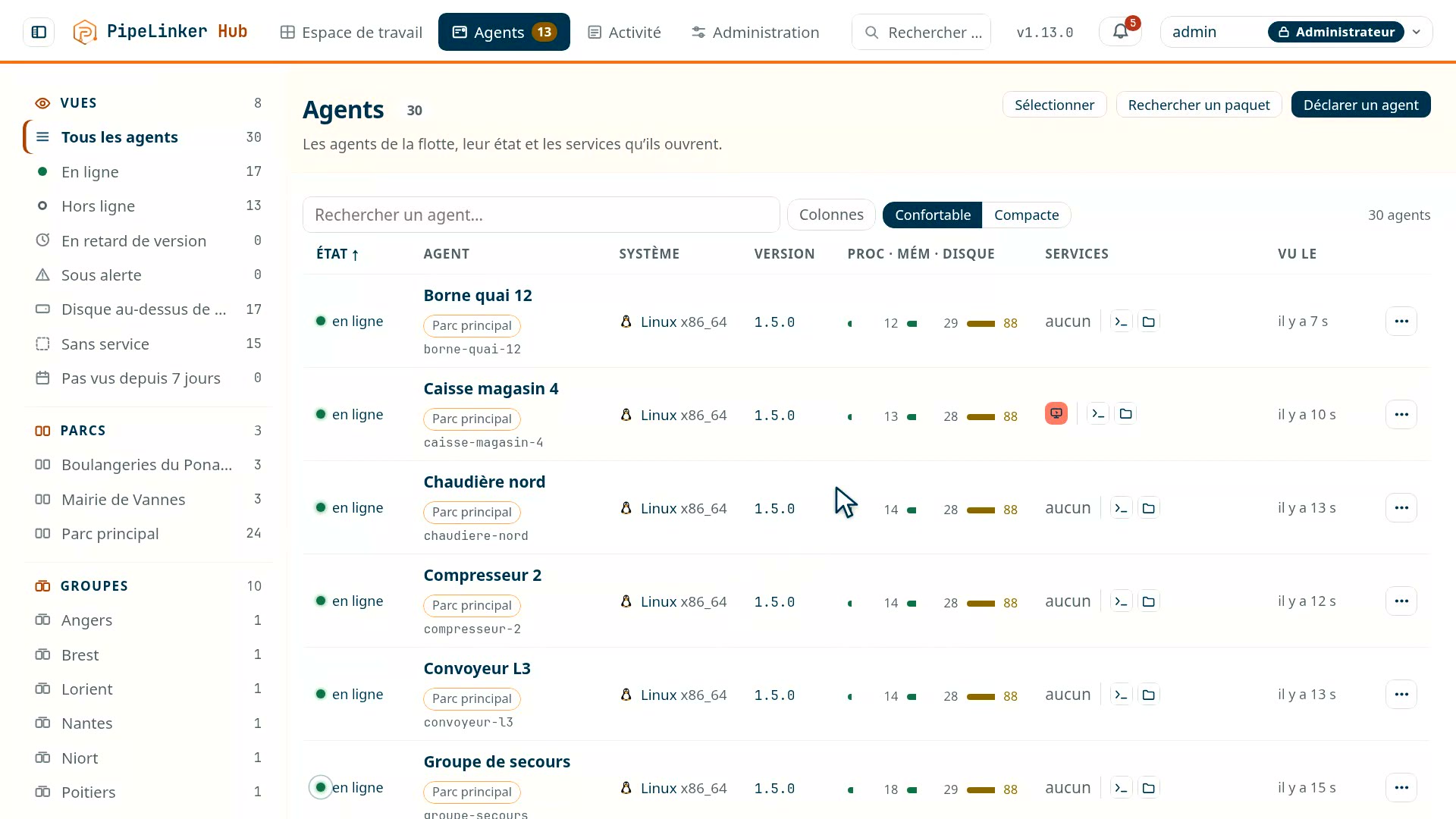
Placed as close as possible to a piece of equipment or to a network, the agent reports the machine's state and metrics, then opens the outbound channel through which it is reached: no inbound port. Linux, Windows and Android, on x64, ARM64 and 32-bit ARM, the same native binary and the same protocol. For a microcontroller, a C library speaks the same contract and builds into your firmware. And when your fleet holds something else - a PLC, a proprietary real-time system - we write the agent that is missing.
 Prise 1
Pick the agent that goes with your environment, IT, OT or IoT. The role does not change: link the machine to the hub, report its state and its metrics, and open access only to the people who are allowed it.
Linux and Windows
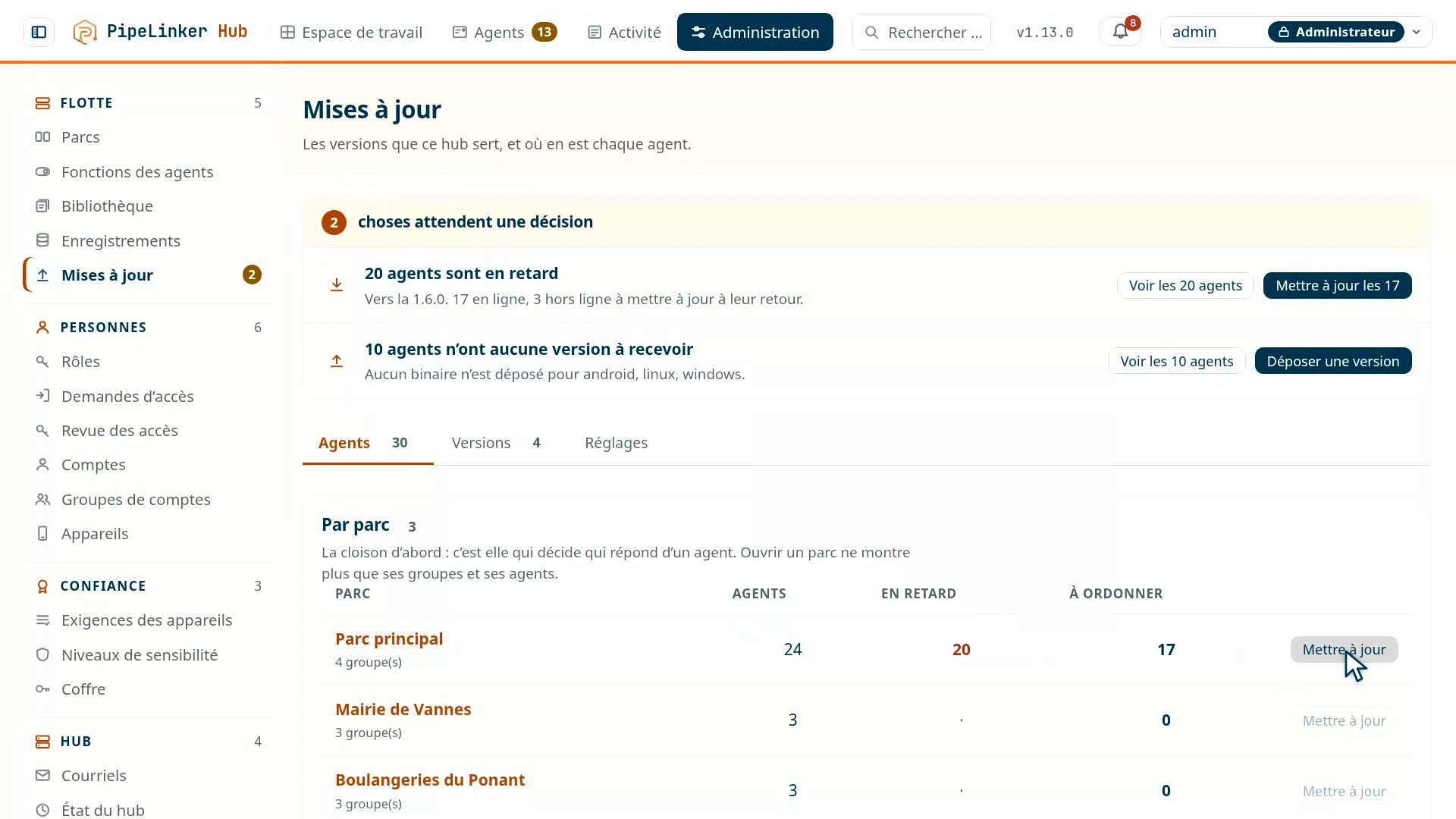
The same native agent on both systems, on x64 and ARM64, and Linux on 32-bit ARM too for industrial boards: five binaries, from the server to the industrial gateway. It establishes an outbound connection to the hub and keeps it: no inbound port is open on the machine.
Windows on ARM has its own binary, even though it emulates x64 very well. The reason concerns you: an emulated process reports "x86_64", so the machine would lie about its own architecture in your software bill of materials - the one you use on the day a security advisory comes out and you must say, without spending the week on it, which machines are affected.
It installs itself, and does not rewrite its own binary. The console gives a command, and that is all: on Windows as on Linux, with systemd, SysV or busybox, with no separate package. It then runs under two accounts: its own, which has no right to write the executable it runs, and the update account, which checks the signature and puts in place only the file it checked - a link or a file slipped in its place is refused.
Each function of the agent can be switched off, for the whole instance, a fleet, a group or a single machine: the collections - location, inventory, usage, sensors -, the terminal and the files, the TCP and UDP relays, system diagnostics, rebooting, updating. The strictest level wins, and a function switched off is off for everyone, administrators included: the hub refuses before the request leaves, and the agent refuses it itself. The install command can also rule out a collection, the terminal or the files in advance, and that choice holds against the console.
A plain outbound internet connection is enough: a 4G or 5G link, a contractor's router, a site link - a network you do not control. A whole fleet reconnects after an outage without bringing the hub down.
They carry everything: telemetry, commands, signed updates, terminal, file transfer, tunnels, remote screen and desktop, inventory of installed packages.
Every machine says what it is made of: maker, model and serial number, motherboard and firmware, processor, physical or virtual machine and the hypervisor recognised, TPM and its maker - and its temperatures, sensor by sensor, under the name the system gives it. The hub also keeps, for a year, the public addresses each machine has connected from: an address never seen before goes to the security log, and to your SIEM.
What is collected is shown, and what was not shown is no longer collected. The Wi-Fi network name, the accelerometer or the battery current went up without any screen showing them; they no longer do, and the hub erased what it kept of them. Data nobody reads is only a risk.
| What the agent does | Linux | Windows | Android | Microcontroller |
|---|---|---|---|---|
| Architectures | x64, ARM64, 32-bit ARM | x64, ARM64 | ARM 32 and 64, x86 and x64 | C99; example on STM32H735 |
| Telemetry and inventory | yes | yes | yes | measurements and tasks |
| Commands | yes | yes | yes | reboot, pause, measurement |
| Signed updates | yes | yes | yes | no, through your firmware |
| Interactive shell | yes | yes | yes, in the application's sandbox | no |
| Files of the machine | yes | yes | yes, the folders the device has granted | no |
| Tunnels to equipment behind the agent | yes | yes | yes | to the services the board declares |
| Screen and desktop of equipment reached through the agent | yes | yes | yes | if declared |
| Screen of the machine carrying the agent | if it serves VNC or RDP | if it serves VNC or RDP | no | yes, served by the library |
| UDP relay, and so SNMP to equipment | yes | yes | yes | no |
| The machine's logs, processes, connections and services | yes | yes, System and Application logs included | no | the tasks |
| Reboot the machine | yes | yes | no | yes |
| Drop a file at a path on the machine | yes | yes | no | no |
On Android, the shell and the files are the ones the system leaves to a non-rooted application: a real terminal, under the agent's identity and in its sandbox, and the folders the device has granted - never the whole disk. The screen reads as two lines, not one: a screen is reached because a VNC or RDP service runs somewhere and an agent leads to it. On a Linux server or a Windows workstation that service can run on the machine itself; on all three systems it can run on a piece of equipment behind the agent, and the tunnel reaches it the same way. What the phone does not do is serve its own screen: that is a permission the agent does not ask for.
Android: a fleet of devices, not a fleet of phones
The Android agent targets professional, purpose-built devices: rugged terminals, industry-specific units, vehicle tablets, kiosks. Not your employees' personal phones, whose management raises questions of an entirely different nature.
What you see without asking
- Battery: level, charging, plugged in, health, temperature.
- Position: latitude, altitude, speed, accuracy, at an adaptive rate.
- Network: type, signal strength, carrier, roaming.
- Hardware: maker, model, processor, phone or tablet, and the temperatures the system lets an app read.
- System: memory, storage, uptime.
- Applications: inventory, install and update dates, storage used.
- Usage: per application, last use, launches and foreground time, and each day's screen time.
A screen on the device says what is sent and what opens, and turns either off; what is turned off there holds against the console. The accelerometer now serves only the device itself, to set the position rate, and the serial number does not go up: Android refuses it to applications.
The position rate is adaptive, and that is not a comfort detail: a reading at a fixed interval drains the battery of a device that is not moving, which is most of the time for a terminal sitting at a workstation.
The install origin, which carries most of the signal
Every inventoried application says what installed it: a store, your
management solution, or adb. That last value means a manual install, outside
the procedure, on a device that should not have received one.
That is what makes it possible to answer two distinct questions: what was installed outside the rules, and is what we deployed actually being used - the second one read in the foreground time.
The available commands
 Prise 6
Ring the device, lock its screen, set its brightness, ask for a one-off position, request an inventory or a usage report.
WiFi and Bluetooth scans were removed from the product
They were there, they are not any more. They captured the identifiers of equipment belonging to third parties who had not consented - the neighbouring access points, the devices of the people around. Neither hashing the identifiers nor a short retention was enough to justify it.
Their place stays reserved and empty in the protocol, so that no future version reuses it by accident.
The device's identity
The private key is generated in the Android Keystore, hardware-backed when the device has it. The application only gets a handle: it can sign with it, it cannot read it. An application backup restored on another device therefore carries no identity.
Enrolment goes through a one-time code; the certificate that comes out is good for ninety days and renews itself. The hub names the device, never the device itself.
Tell us what equipment, behind which networks. We show you the console on it.
What the Android agent does within the system's limits, and what it does not
A shell, files, tunnels - in the sandbox. The terminal is a real pseudo-terminal, with line editing and job control, but it runs under the application's identity: no root, and none of the system's administration commands. The files are the ones the device has granted - the agent's own folders always, shared storage or folders designated one by one if they have been opened to it - never the whole disk. The tunnels to the equipment on the local network are the same as on Linux and Windows. We are not the ones setting these limits, Android is, and it grants nothing more to a non-rooted application.
The phone does not serve its own screen. Seeing and taking over an Android device's screen needs a permission the agent does not ask for, and it is better to know that before building a procedure on it. That is not the same as the screen of equipment behind it: that one is reached through the tunnel, from a phone as from anywhere else.
A microcontroller, with the same identity and the same contract
A board with no file system, no interpreter and no megabytes to spare joins the same hub as your servers: a C99 library that speaks the contract of the Linux, Windows and Android agents, frame for frame. It allocates nothing, starts no thread and opens no socket itself: one object, called from the main loop or from a task.
What it does
- introduces itself to the hub, and says what it can do;
- reports the silicon temperature, the load, the memory and the uptime, at the rate the hub sets;
- shows the real-time system's tasks as processes, with their stack and their share of the processor;
- opens a tunnel to a service the board declares, and to nothing else;
- serves its own screen over VNC, in the console;
- obeys reboot, pause and a request for measurements.
Its identity is born on the board
The board generates its P-256 key and has it signed by the hub with a one-time code - the only moment a person decides that it joins the fleet. The private key never leaves it; what goes on the wire is the public key and the proof that the other half is held. The tunnel then runs over TLS with that client certificate, and the hub's authority is pinned - never a system store.
What is yours to do, and what we supply
On quotation, we supply the library; your team builds it into your firmware. What the library cannot know about your board comes through interfaces you fill in: the network connection, the clock, what the board measures, what it displays. The network side is ready for lwIP, with or without a real-time system, and for mbedTLS; a modem that terminates TLS itself plugs in too.
A complete example on the STM32H735 is the starting point: network, encryption, screen, enrolment, on a real board. And a consultant can work alongside your team during the integration, then for support.
Custom: when the fleet fits none of these boxes
The agents above cover most cases. But an industrial fleet always holds something else: a controller on a proprietary real-time system, a PLC with its own environment, a unit whose manufacturer froze the toolchain eight years ago.
Those are often the most important machines in the fleet, and they are precisely the ones no generic tool can reach. We write the agent that is missing.
Before committing, we look with you at the system, the protocols it speaks and how it would be deployed on. That study is what says whether it is feasible, and at what price: there is hardware nothing can be placed on, and saying so first beats discovering it halfway through.
Why one more agent is not paid for in months
A PipeLinker agent is not a complicated piece of software. It opens an outbound connection, speaks a protocol defined once and for all, and does what it is asked. All the rest - the database, the interface, the rights, the audit, the progressive rollout - lives in the hub and does not move.
The protocol is a written contract, not a habit
The exchanges are described in a shared Protobuf file, from which the code is generated in each language: a divergence becomes a compile error, not a frame badly decoded in production. Writing an agent means starting from a contract that exists, not from a blank page.
The target dictates the language, not our preferences
We write our agents in Rust when we get to choose. When the manufacturer imposes its toolchain, or only a C exists, that constraint decides.
A minimal agent - announce its identity, report a few measurements, receive orders - fits in very little code. That is what makes the exercise reasonable where embedding a full environment is not.
What the agent reports is yours
A flow rate, a pressure, a cycle counter, a manufacturer fault code, the state of a valve: those are the values that mean something to your business, not memory usage. The agent we write reports what your equipment can say, and the hub displays it, keeps its history and thresholds it like the rest.
What does not carry everywhere, and is better known
Not every capability goes all the way down to a microcontroller
The tunnels and the screen go down to it; files and updates do not. A board without a file system has no folders to open, and the library does not update itself yet: that awaits a change in the contract, and your firmware carries its own updates in the meantime.
TLS has a cost that cannot always be paid. On a very constrained target, the question is settled case by case - a lightweight stack, an already encrypted link, or a local gateway that carries the agent for a group of silent devices.
The Android agent is already an accepted example: a shell and files within the system's limits, and not its own screen - the screen of equipment behind it is reached through the tunnel.
How it goes, from the first contact
We look at the target first: processor, memory, network stack, toolchain, and what it can already say about itself. This step is short and settles half the questions.
Then comes a minimal agent that connects and reports a few values, on one unit of your hardware. That is the moment when we really know whether the target holds, and it comes early rather than late.
The rest - the measurements that matter, the commands, the remote update - is added afterwards, by iterations, on a base that works.
Who it belongs to
The agent written for your hardware is developed for you and delivered to you. The terms - ownership of the code, the right to take it over, maintenance over time - are settled in the contract rather than on this page, because they are not settled the same way depending on whether the equipment is yours or the one you sell to your customers.