
Technical
One binary, one database, nothing more to run
What your team will have to keep running: one binary and a PostgreSQL. No extension to compile, no message broker, no cluster. You keep control of where the hub lives, of its availability and of your fleet's data: no outside platform is needed to open an access. And an agent that refuses what it must not do, even when the order comes from the server.
The agents come with it, and it is the hub that distributes them to your fleet. Each one acts as a door onto its local network: a PLC, an HMI or a camera is reached through it, with nothing to install there and no port opened. The portal is on our side: your licence lives there, with the signed binaries. The hub only connects to it if you ask it to - a setting, off by default - and it then proves it carries a valid licence without ever transmitting it. On a network cut off from the internet, that link does not exist and the binaries are dropped by hand.
The hub, the agents, the portal
A server you install, agents placed on your machines, and a portal we run for your licences and your binaries - that is all. None of your data passes through ours, and an agent also reaches what lives behind it: the equipment on its local network, which has nothing installed on it.
One binary and a database, nothing else
That is all PipeLinker Hub is on the server side: a native executable carrying the server and its web console, and a PostgreSQL database. No cluster to size, no message queue, no distributed cache, no engine to install around it.
That makes it deployable just about anywhere: a virtual machine, a physical server in your room, a systemd service, your usual orchestrator, or a network entirely cut off from the internet. One instance keeps your fleets apart from one another, without installing one per customer or per site.
The customer area guides the installation, step by step, for yours: three methods on Linux - the Debian package, the shortest, Docker Compose, or the binary set up by hand with systemd -, on x86_64 or ARM64, and a Debian in WSL2 for whoever starts from Windows. The prerequisites follow from the size of your licence, the commands carry the real version and the real file name, and what the portal observes - the file downloaded, the hub that introduced itself, the licence sealed - ticks itself.
The hub serves its own TLS: it reads a certificate and a key in a folder, and what puts them there is none of its business - certbot, an enterprise PKI, or a reverse proxy in front of it if you already have one.
What the diagram shows
The portal is on our side: it carries your licence and the signed binaries. The hub only connects to it if you ask it to - the setting starts off - and it then proves it carries a valid licence without ever transmitting it. On a network cut off from the internet, that link does not exist and the updates are dropped by hand.
The server orchestrates; the agent executes. Both share the same code, and therefore the same validation rules: the two ends of the chain do not drift apart when a version changes.
A database your team already knows
PipeLinker Hub installs on your premises. Your fleet inventory, your metrics, your positions and your session recordings pass through no third-party service - and above all, they are stored in PostgreSQL, not in a proprietary technology you would have to learn to operate.
What your operations team gains
Your existing procedures apply
Backup, restore, monitoring, replication: your team uses the same tools as for its other databases. No specific runbook to write, no training, no on-call duty on a technology nobody knows in-house.
One component to run
PipeLinker Hub is a service and a database. No cluster to size, no message queue, no distributed cache to watch. A deployment of 1,000 devices fits on a modest machine.
Your data really is yours
PostgreSQL is under a permissive licence, and we use no extension that would restrict what you can do with it. You query your database directly with your BI tools, you create your own views, you export what you want, when you want. Some solutions on the market rely on components whose licence forces them to forbid you from changing your own schema - that is not our case, and it was a design criterion.
No legal surprise
No licence for your procurement department to vet, no clause to pass on, no component with an ambiguous status in your software inventory.
Why not TimescaleDB
The question comes up often, since we store time series. The extension is technically solid, but what would justify adopting it is not under a free licence: the Timescale License restricts redistribution and commercial use.
For a product delivered on your premises, that would mean imposing those terms on you - and an extension to install, absent from a good share of managed PostgreSQL offerings.
So we handle the aggregation and purging of time series ourselves, on plain PostgreSQL. A little more work on our side, no legal constraint on yours.
Tell us what equipment, behind which networks. We show you the console on it.
What it consumes, on your premises
PipeLinker Hub handles from 1,000 to 40,000 devices per deployment. The collection interval is adjustable per agent: a few minutes for fleet monitoring, closer together for critical equipment. The connection to the devices stays open continuously: commands and remote access do not depend on the collection interval, and remain possible even on a fleet polled every ten minutes.
Raw data is aggregated and then purged according to the retention you choose: a long history without a database growing indefinitely.
We provide a sizing table (processor, memory, storage) by device volume and by retention period, so that you can provision before committing.
And no implicit trust, including towards our own components
What precedes describes what runs and where. What follows describes what each link refuses to take on trust: that is where the difference lies between an administration tool and a product you let touch a machine in production.
One identity per device, never a shared key
Every agent carries its own client certificate. Not an API key shared by ten thousand devices, whose leak from a single one would compromise the whole fleet. Revocation is individual and immediate.
The private key is generated on the device and does not leave it; the certificate is short-lived and renews itself. No durable token to steal from a configuration file.
A consequence to know before deploying
A client certificate only exists in the TLS handshake. A reverse proxy that terminates TLS erases it, and no agent connects any more. The console's name, for its part, goes behind a proxy like any other site. That is the main thing to know when placing the hub in an existing infrastructure.
Your hub signs these certificates itself, through an authority of its own per fleet, or hooks into the trust chain your organisation already runs. In both cases the authority is yours: the hub runs on your premises, and what it generates leaves no more than what you give it. One identity per device, compatible with your PKI
A binary does not install unless it is signed
A remote update is, literally, arbitrary code execution across a whole fleet. What protects you is therefore not the channel - it is already authenticated and encrypted - but the proof that the binary really comes from whoever claims to have produced it.
Two checks, and they do not serve the same purpose. The hash protects against accident: a truncated download, a lying disk, a stale mirror. It protects against nothing else, since it travels the same path as the binary - whoever holds that path holds both.
The signature protects against malice. It can only be produced by the holder of the private key, which is neither on the portal, nor on the hub, nor on the agent. A compromised hub can lie about everything, it cannot sign.
The verification key is in the binary, not in a setting
The public key is compiled into the agent, and into the hub for its own update. A key placed in a configuration file would be replaced by that of whoever wants to sign whatever they like, and the verification would prove nothing any more: going around it then requires rebuilding the binary, which is the level at which we decided to stop.
Without a compiled key, every update is refused. The default is closed: a binary that cannot be verified is a binary that is not installed. Neither an agent nor a hub updates itself on a binary whose signature does not match.
Three checks, and only one that decides
The portal refuses an upload whose signature it does not recognise, and the hub does the same with the binary handed to it: the mistake is caught in front of whoever makes it, not weeks later on a distant machine.
But neither of them is the authority: they hold no signing key. The only one that decides is the check made at the end, on the machine, with a key nothing above can influence.
Zero Trust access: the person, their key, their device
Through your directory, if you have one. The hub delegates sign-in to Entra ID, Google, Keycloak or any OIDC provider that publishes its discovery document - authorisation code, PKCE, state and nonce -, then issues its own tokens. The provider says who you are; it grants no right. Only accounts declared in the hub get in, and their roles remain the hub's. The second factor is then the directory's, and a role that requires a hardware key accepts it when the directory attests one. It is in every offer, at no extra cost.
With a security key, if you want one. A YubiKey, the key built into the workstation or a phone's passkey replaces the six-digit code, or opens the session on its own, with no password, when it verifies its holder. The hub keeps only its public half and its counter, and refuses a key whose counter goes backwards - the sign of a cloned key -, logging it. A role can require one; administrators too, through a setting. PipeLinker Desktop and Mobile ask for it the same way, over USB, NFC or the phone's passkey.
Otherwise, a password, then a second factor by one-time code - the one the usual authenticator applications produce. Ten backup codes come with enrolment: enough to last until a phone is replaced.
The order matters, and it is checked. The code is asked for before the session is opened: the other way round would leave a session open to someone who only knows the password.
A sensitive gesture asks for proof again, at most every five minutes: changing a role or an access, creating an administrator, touching the vault or a fleet's authority, adding or removing a key. A session left open on a workstation is not enough to grant oneself rights.
If the directory goes down, a local administrator account remains the fallback route, and the console files it under that name; every sign-in through it, taken while the directory is active, is logged.
PipeLinker Desktop and Mobile go through the directory too, through the system's browser: the provider sees nothing new to declare. And the directory can cut: when it closes a session or disables an account - through OpenID Connect back-channel logout, or through CAEP shared signals -, the hub at once closes whatever the person held open, on the console as on their devices. What this does not cover yet: OIDC and not SAML, and nothing is created automatically from the directory.
Their device proves where they come from. Each fleet says what it requires of the workstation or phone connecting to it, and the report is renewed every five minutes. On the workstation, PipeLinker Desktop enrols a key in the TPM, whose certificate chains up to its maker's roots, and every report carries a quote from the chip over a nonce drawn by the hub: Secure Boot, the boot chain and, on Windows, BitLocker are proven. On the phone, its chip signs the attestation. What stops complying is cut. What stays declared, and is said to be: the antivirus, and on Linux LUKS encryption - nothing the TPM measures says whether it opened the disk. And the browser measures nothing: a critical target asks for PipeLinker Desktop or Mobile.
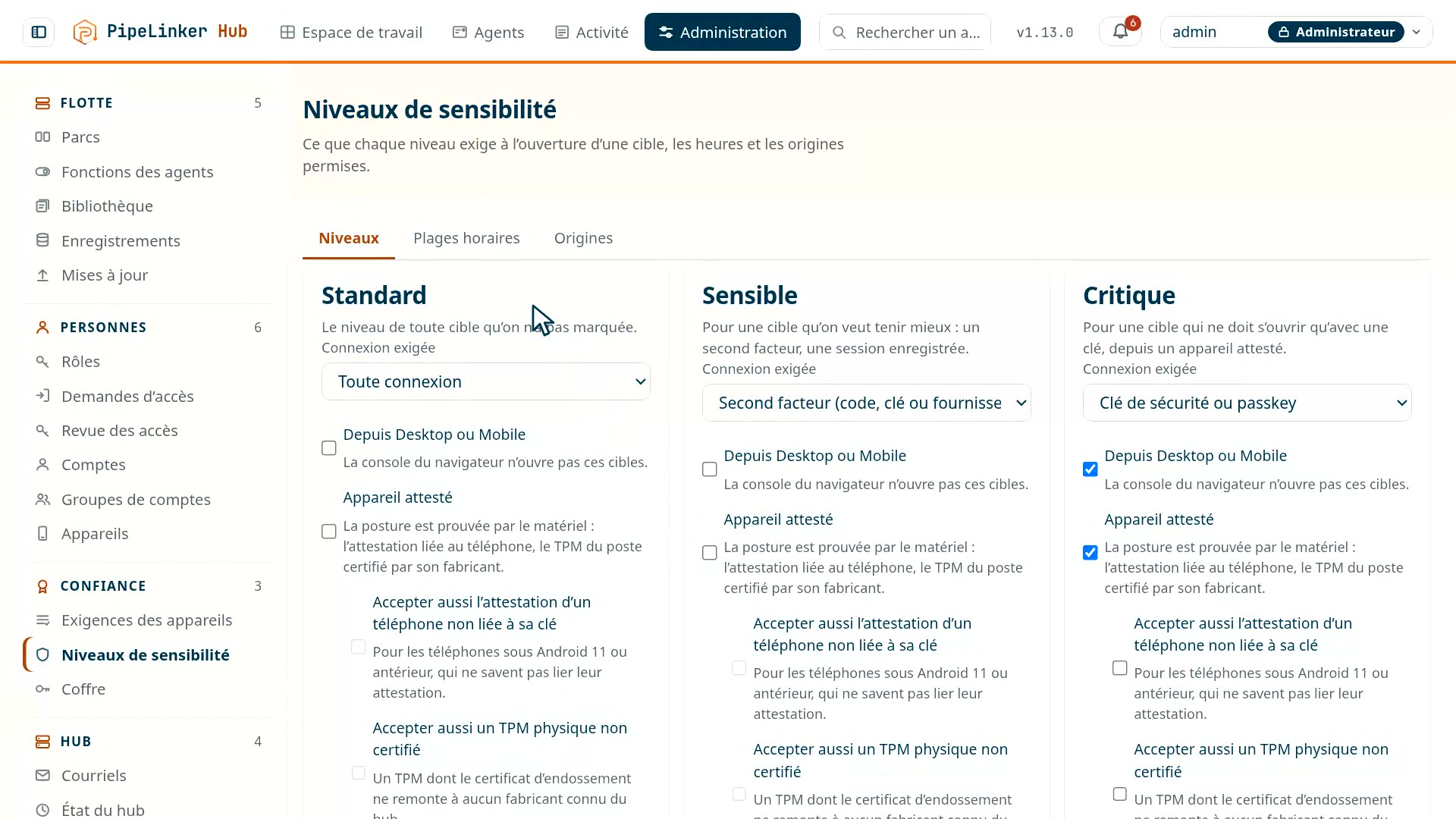
And the target says what it requires. Each service, machine or fleet is rated standard, sensitive or critical; by default, a critical target asks for a security key, an attested device, PipeLinker Desktop or Mobile, and a recorded session. Hours windows cut a session that leaves them, warned five minutes before; origin rules refuse a network or a country. And a right can have an expiry: just-in-time access is requested, approved, and closes by itself.
 Prise 18
An account opens through an activation link, or with a password its holder changes at first sign-in, and an email tells them when it is created. On a new hub, the first administrator is created from the console, with a bootstrap token the hub writes to its own log and nowhere else; the door closes as soon as an account exists.
The agents are not concerned: they authenticate by certificate, with nobody in front of the screen. One identity per device, compatible with your PKI
Least privilege
Rights are set by fleet, by group and by action, and handing out rights is itself a right - that is what makes it possible to entrust a fleet to an administrator without entrusting them with the rest of the installation. The initial administration account is exempt from it: without that exception, inadvertently removing the last permission would close the door for good.
The interactive shell is treated as what it is, a powerful capability, and stays reserved for the roles that warrant it.
Partitioning between organisations is strict, with session expiry, key rotation, rate limiting and controlled storage of secrets.
Rust, for what it removes
The server and the agents handle networking, cryptography and data coming from outside - exactly the ground of memory overflows and corruption. Rust eliminates that family of flaws by construction, without imposing the overhead of a garbage collector: the footprint stays small and predictable, including on a modest ARM unit.
The hub defends itself, and says so
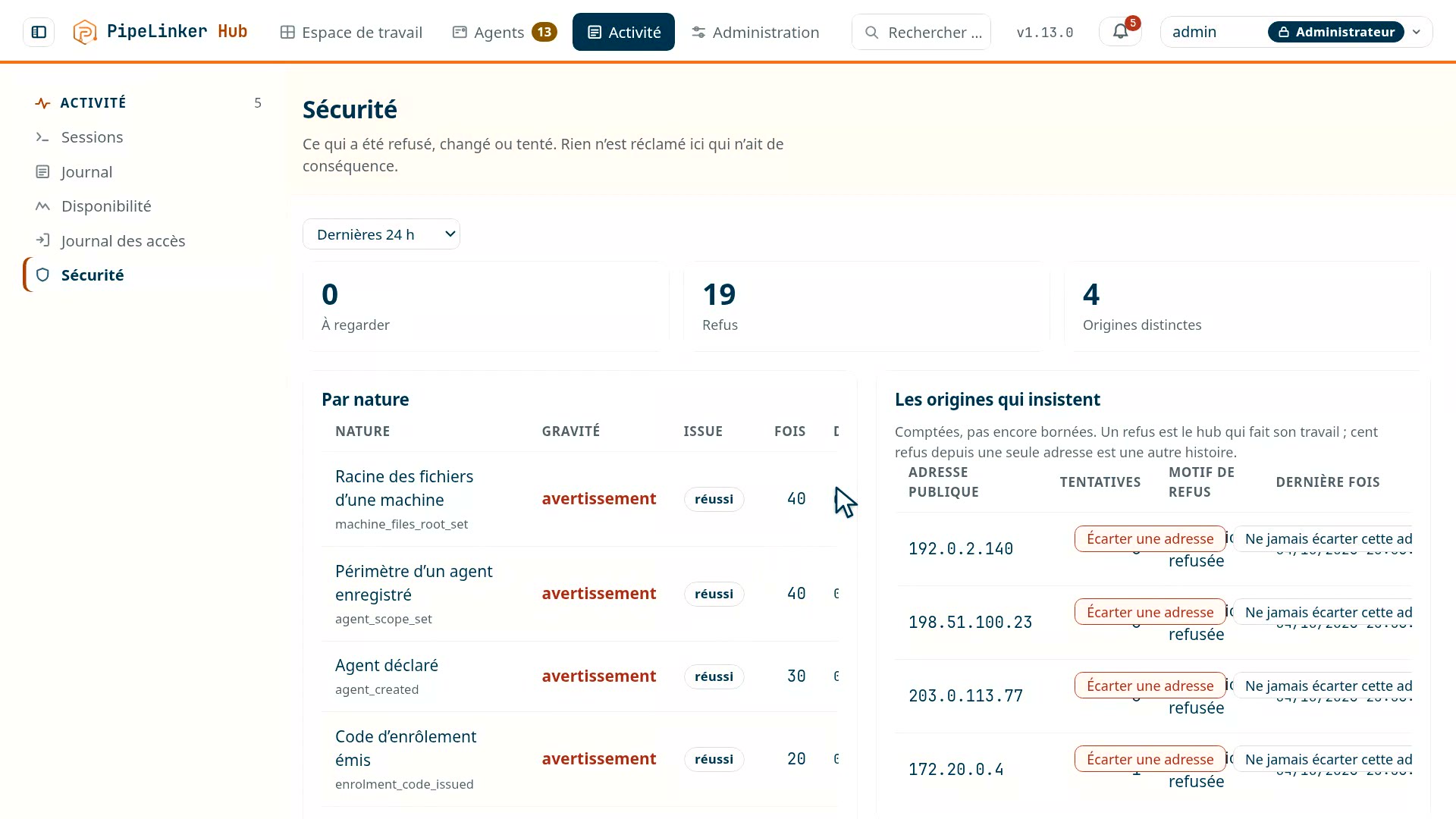
A hub is a door onto a fleet, and a door gets probed. The hub keeps two distinct logs: the access log - who signed in to the console, when, from where, and who failed - and the security log, which counts refusals by origin, keeps host-key changes and an administrator's decisions, and survives the purge of operational data. An overview on a sliding window gives the totals by nature and the origins that insist.
 Prise 10
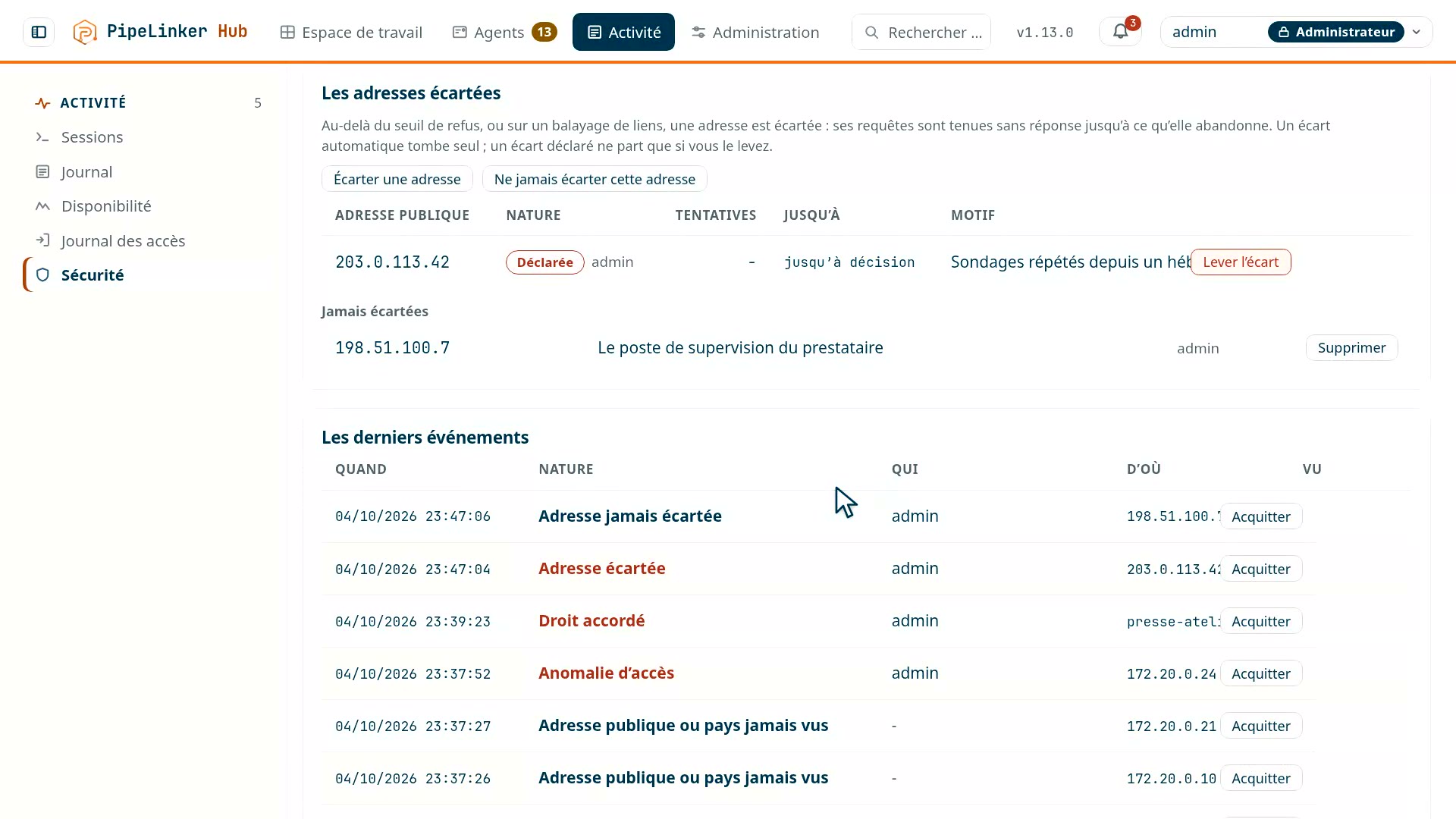
Brute force is counted, and cut off. Everything that takes a code typed by hand - a password, an enrolment code, a second factor - is limited to five attempts per address per minute. Beyond that, fifty refusals in five minutes from the same origin are no longer noise: the severity rises, and the address is blocked by itself, for a period that lengthens if it starts again. An administrator can also block an address by decision, or put one on a whitelist the threshold will never touch; private networks are on it by default, and the hub refuses to block the address it is being spoken to from - you do not lock yourself out.
Guessing links shows too. Ten unknown web-access labels in one minute from the same address make a scan: it is an alert, sent to subscribers through the panel and by email, and the source is blocked for an hour, longer if it insists. Getting a link wrong two or three times stays under the threshold.
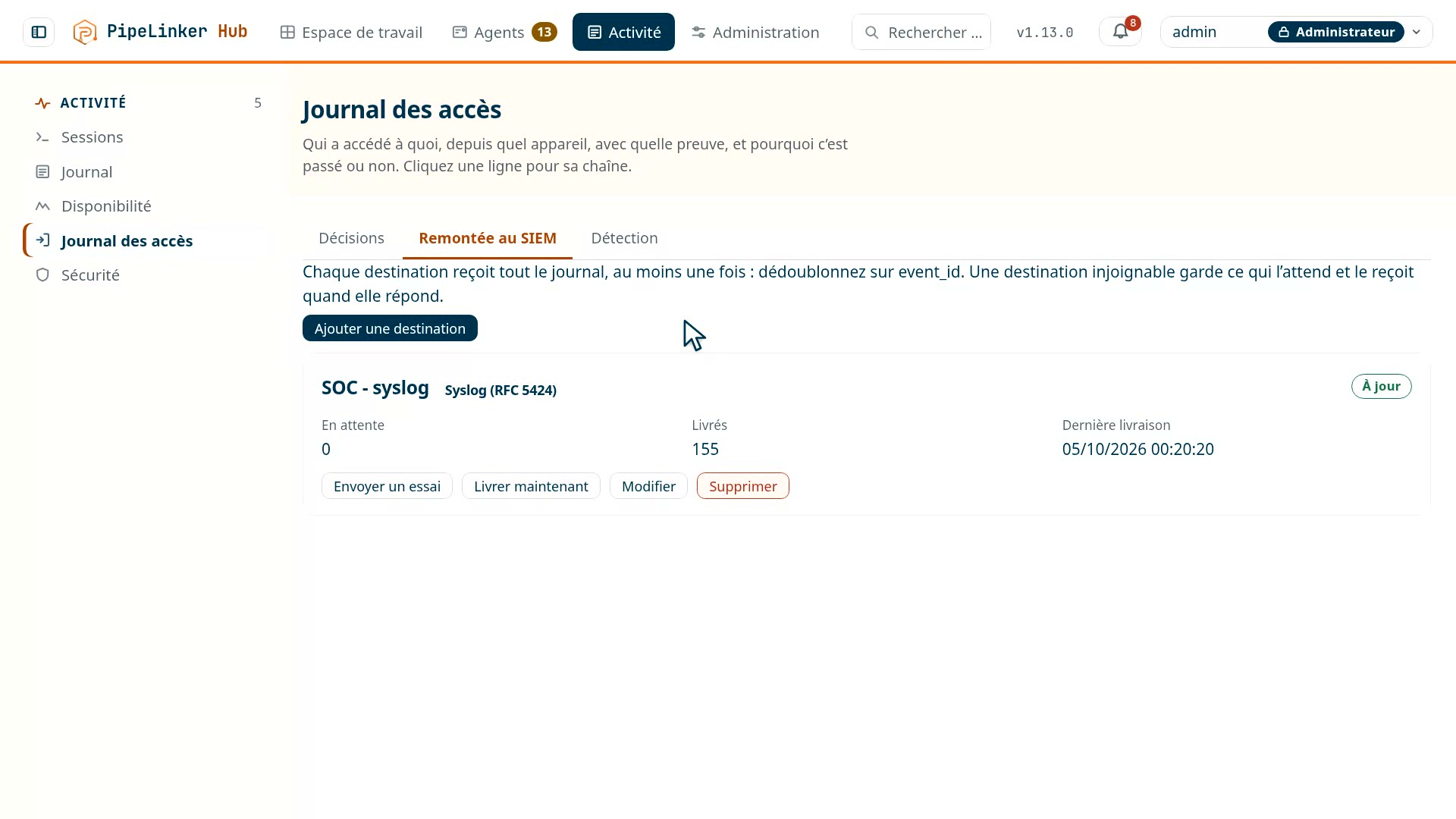
The access log goes up to your SOC. Every decision - opening, refusal, cut, end - is a dated event: who, with what proof, from which device and in what state, towards which target, and the exact reason for a refusal. It filters and exports in the console, and goes to your SIEM: syslog in CEF or JSON over TCP or TLS, Splunk, Microsoft Sentinel or OpenTelemetry. An unreachable destination receives what was waiting for it when it comes back.
 Prise 17
And the hub spots what is out of the ordinary, account by account and against its own history: an unusual hour, an address or a country never seen, a new device, an abnormal volume of sessions or refusals. A machine connecting from a new public address reports it too. Every anomaly is an alert, and goes to the SIEM.
 Prise 11
What is critical comes up. A host-key change that makes a session fail, an origin that insists, a critical security event: each produces a notification, sent by e-mail if a relay is configured, and the log line stays even if the notification is lost. What someone typed into a password field is never written down: it is often somebody else's real password.
What the fleet's security lets you demonstrate
Knowing what runs, being able to fix it fast and to prove it, is no longer merely good practice: it is what the Cyber Resilience Act will require of manufacturers. What the regulation asks
Page last updated on 6 October 2026. Technical page, maintained by the PipeLinker team at LOOTUS SECURITY, publisher of the product. The date comes from the repository, not from a hand edit.